
本日のTips!は、リストビューで選択したレコードを引数にしてフローを実行する方法のご紹介となります。
なるべく標準機能を利用して、リスビューで選択したレコードに対して一括で処理したいという要件は多々あるかと思います。
昔はよくボタンとJavascriptを組み合わせて実現していましたが、今はフロー(Flow)が非常に使いやすく高機能になってきたため、カスタムボタン+Flowで実現することをお勧めしています。
ただし、今回ご紹介する方法は、完全に標準というわけではなく、一部Visualforceを利用します。
※セールスフォースのヘルプでも紹介されているやり方となります。
- リストビューからフロー(Flow)を呼び出す方法
- Visualforce経由のフロー実行及びパラメータの受け渡し方法
1.リストビューで選択した取引先責任者を画面フロー(Flow)に表示してみよう
今回は、サンプルとして取引先責任者(Contact)を利用します。
取引先責任者は、リストビューで選択した取引先責任者に対してリストメール送信(一括で複数の取引先責任者へメールを送信)の機能が用意されていますが、そのほかの用途として、例えば、標準のアンケート(Survey)を顧客担当者へ一括で送信したいという場合に、今回ご紹介する機能を使えば実現することができます。
アンケートを複数の取引先に一度に送信する方法は別の記事でご紹介します。
 サポーターさん
- フロービルダー(Flow Builder)を新規作成
- フローを実行するVisuaforceの作成
- Visualforceを実行するカスタムボタンを作成
- カスタムボタンを取引先責任者へ表示する
- 処理を実行して、設定内容を検証する
では、一つ一つ手順の内容を解説していきたいと思います。
1.フロービルダー(Flow Builder)を新規作成
 管理人
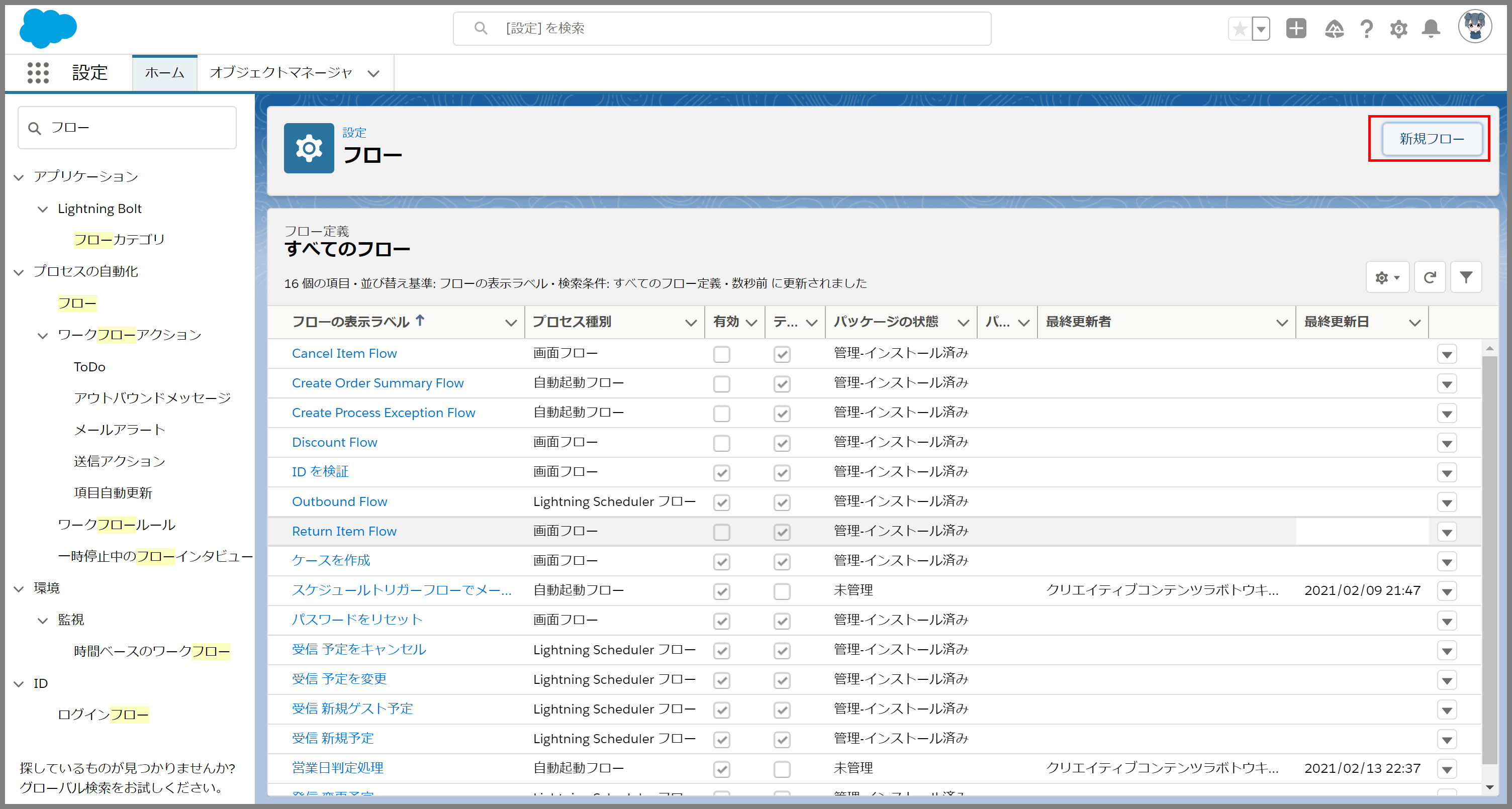
管理人1.Salesforceにログインして、設定から[フロー]を検索して、フロー画面から、[新規フロー]ボタンをクリックします。
画像をクリックすると拡大できます。
2.続いて、画面フローを選択して、[次へ]ボタンをクリックします。

※リストビューで選択されたレコードを使って、フローの画面上で選択されたレコードを別の値に更新する処理を行います。
3.フロービルダー(Flow Builder)では、まずリストビューで選択された取引先責任者のレコードをフロー画面のパラメータとして受け取るための変数を定義します。[新規リソース]ボタンをクリックします。

4.新規リソース画面で、以下の内容を登録して、[完了]ボタンをクリックします。
- リソース種別:変数
- API参照名:API名をアルファベットで入力
- 説明:変数の説明を入力
- データ型:レコード
- オブジェクト:取引先責任者(Contact)
- 複数の値を許可(コレクション):ON
- フロー外部での可用性:入力、出力ともにチェック
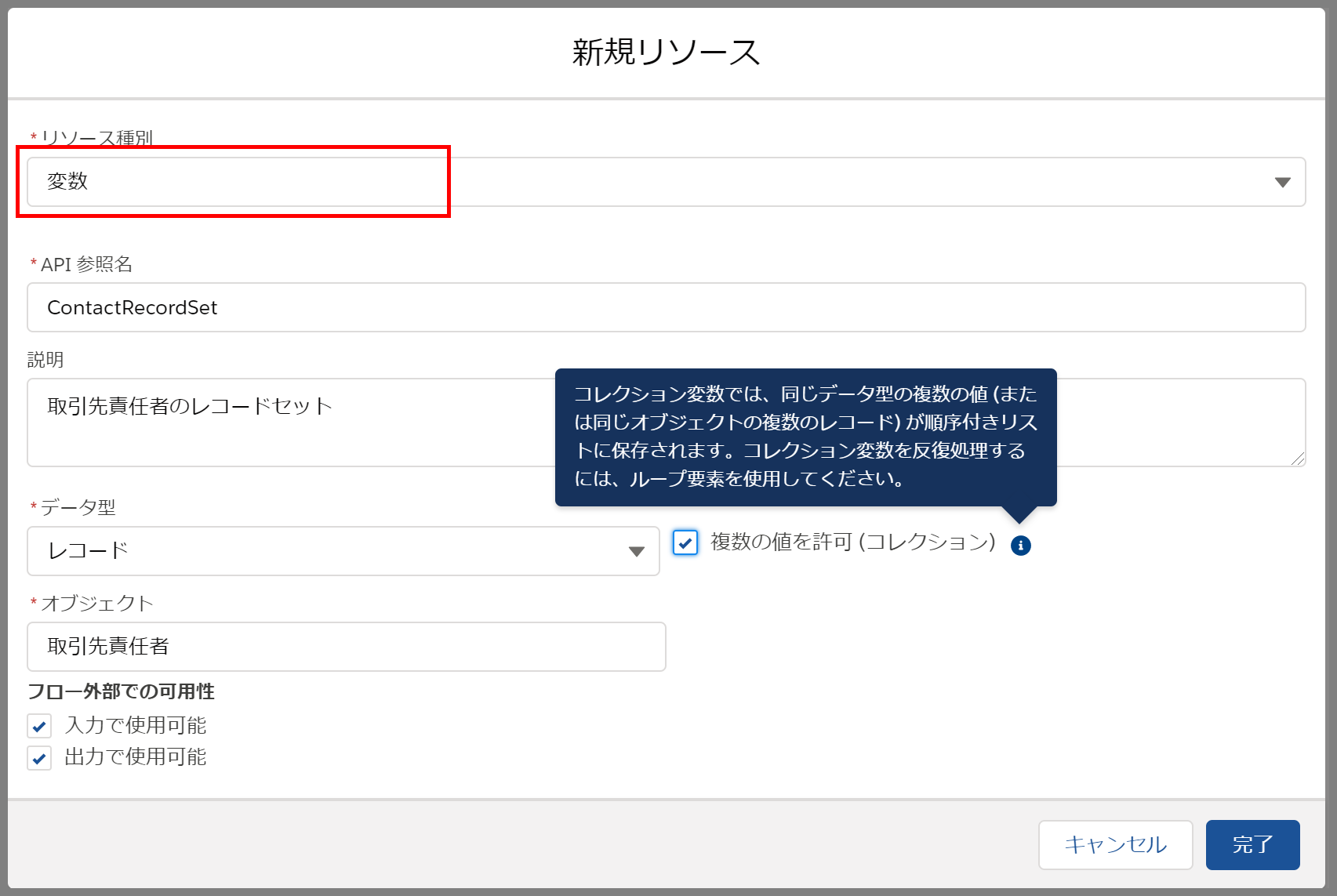
※今回はVisualforceからFlowに取引先責任者のレコードセットを入力パラメータとして引き渡すため、フロー外部での可用性の入力で使用可能にチェックしています。
5.次に画面を作成します。要素を追加から、画面を選択します。

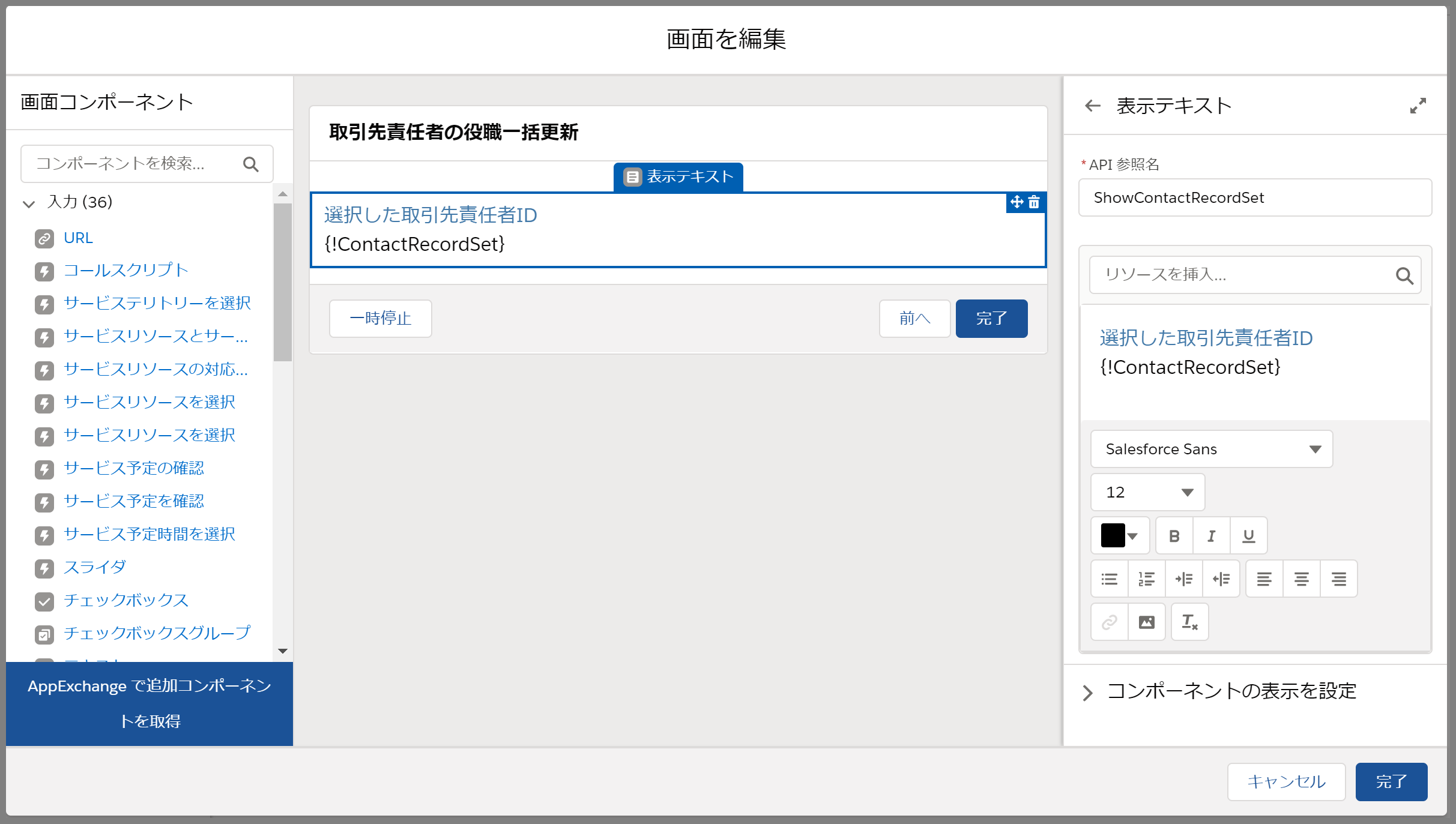
6.画面を編集にて、以下の内容を設定します。
- コンポーネント:表示テキスト
- API参照名:API名をアルファベットで入力
- テキストの内容:{!ContactRecordSet}
7.最終的に以下のような構成となります。
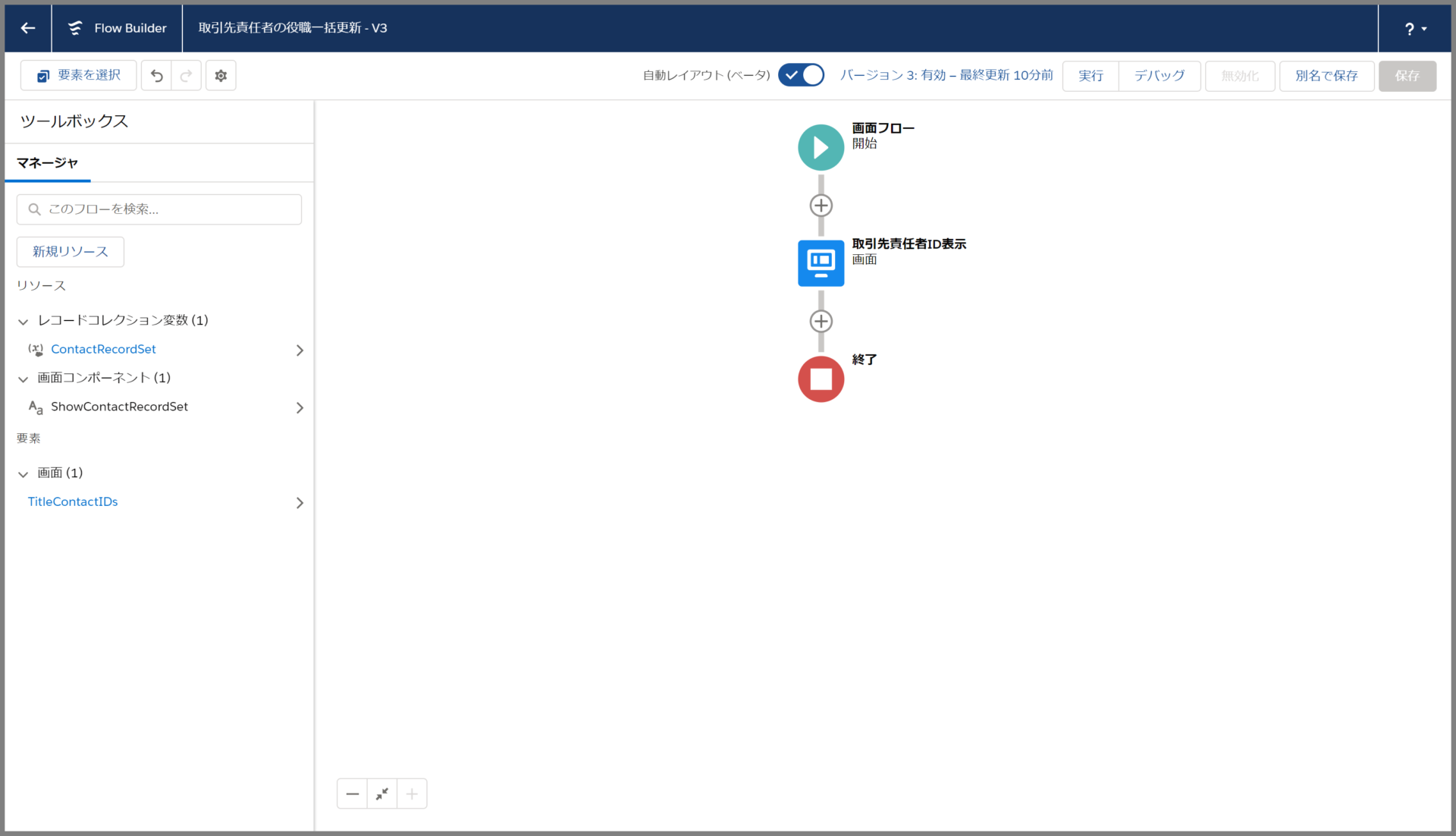
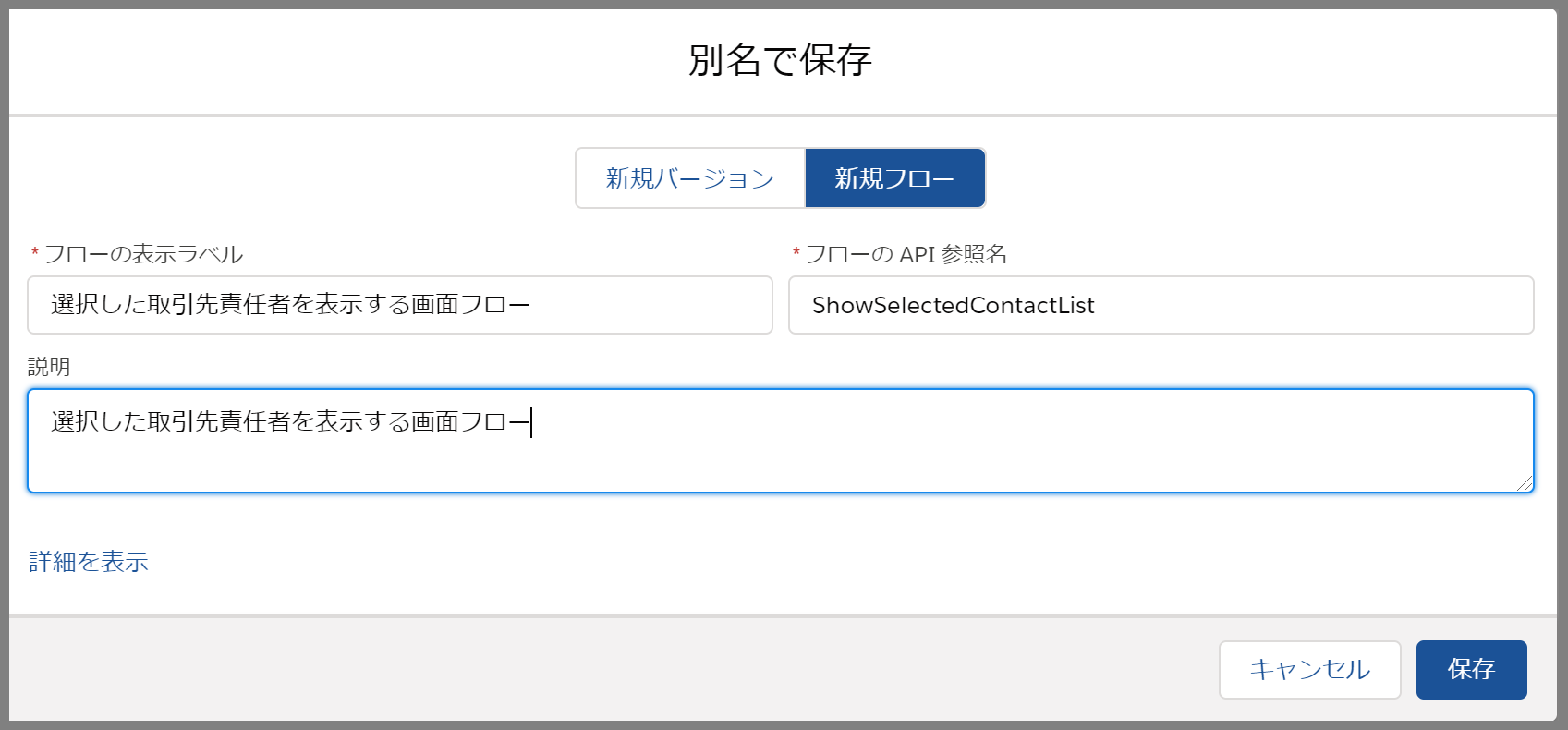
8.最後に保存ボタンをクリックして、名前を付けて保存して、有効化します。
2.フローを実行するVisualforceの作成
次にリストビューで選択した値をフローに引渡すVisualforceページを作成します。
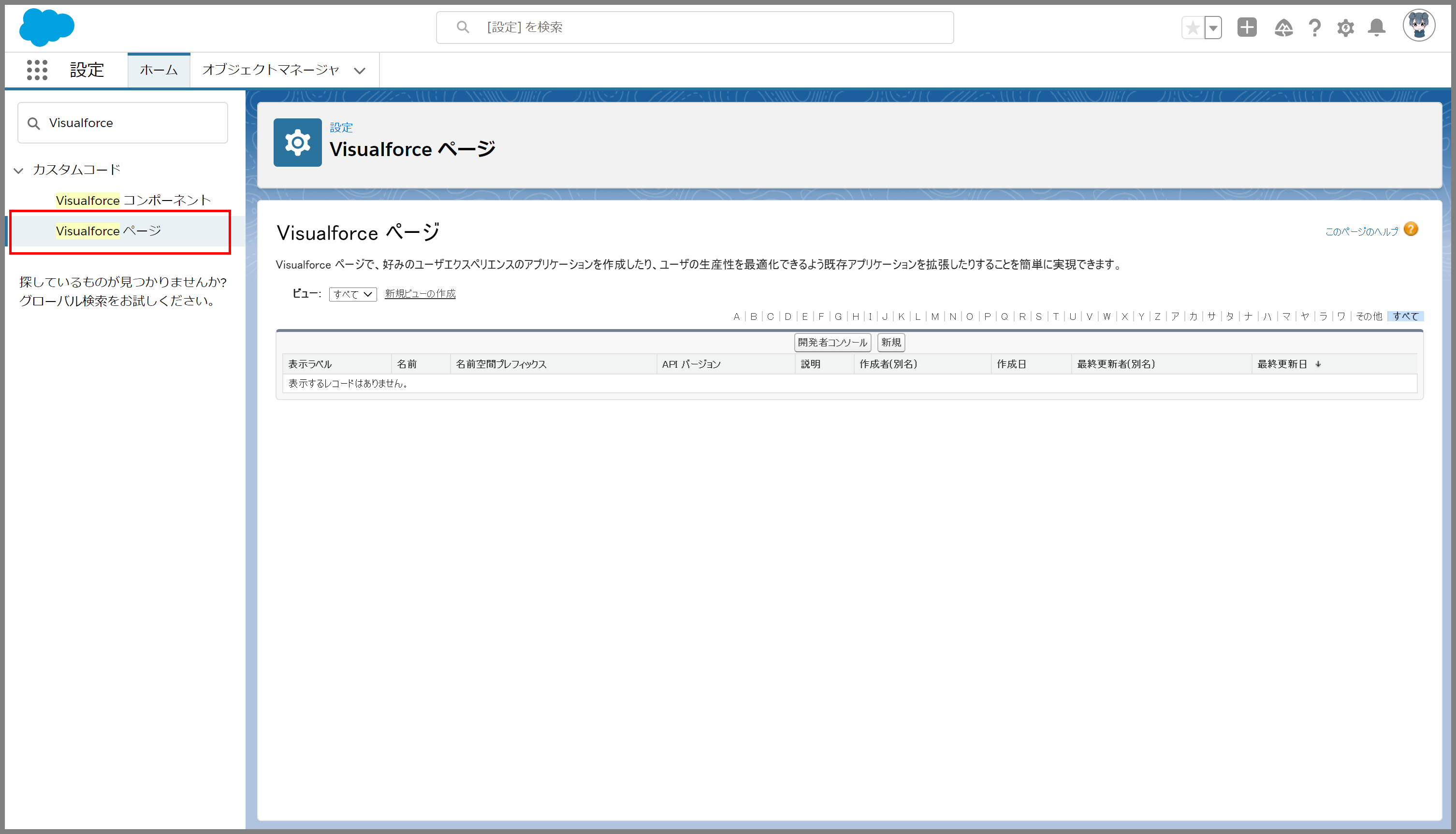
1.Visualforceページから[新規]ボタンをクリックします。
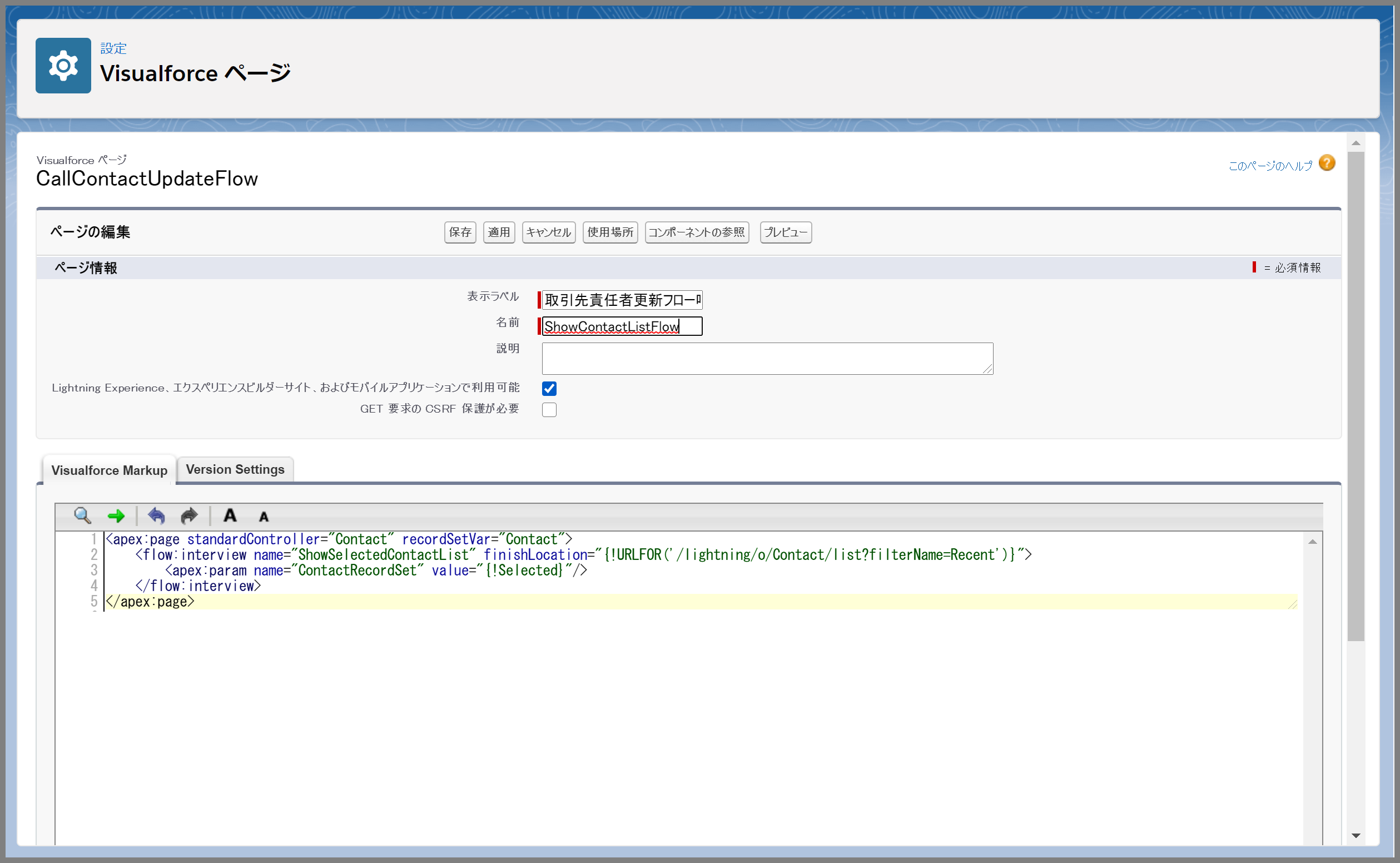
2.Visualforceページにて、以下の内容を登録します。
/* 標準コントローラでContactを指定します。 */
<apex:page standardController=”Contact” recordSetVar=”Contact”>
/* flow:interview:作成したフローのAPI参照名を指定
* finishLocation:最近参照した取引先責任者のリストビュー */
<flow:interview name=”ShowSelectedContactList” finishLocation=”{!URLFOR(‘/lightning/o/Contact/list?filterName=Recent’)}”>
/* param name:フローの中で作成した入力変数を指定します。
* value:”{!Selected}”を指定 ※リストビューの選択値を設定 */
<apex:param name=”ContactRecordSet” value=”{!Selected}”/>
</flow:interview>
</apex:page>
管理人3.Visualforceを実行するカスタムボタンを作成
作成したVisualforceページを実行するカスタムボタンを作成します。
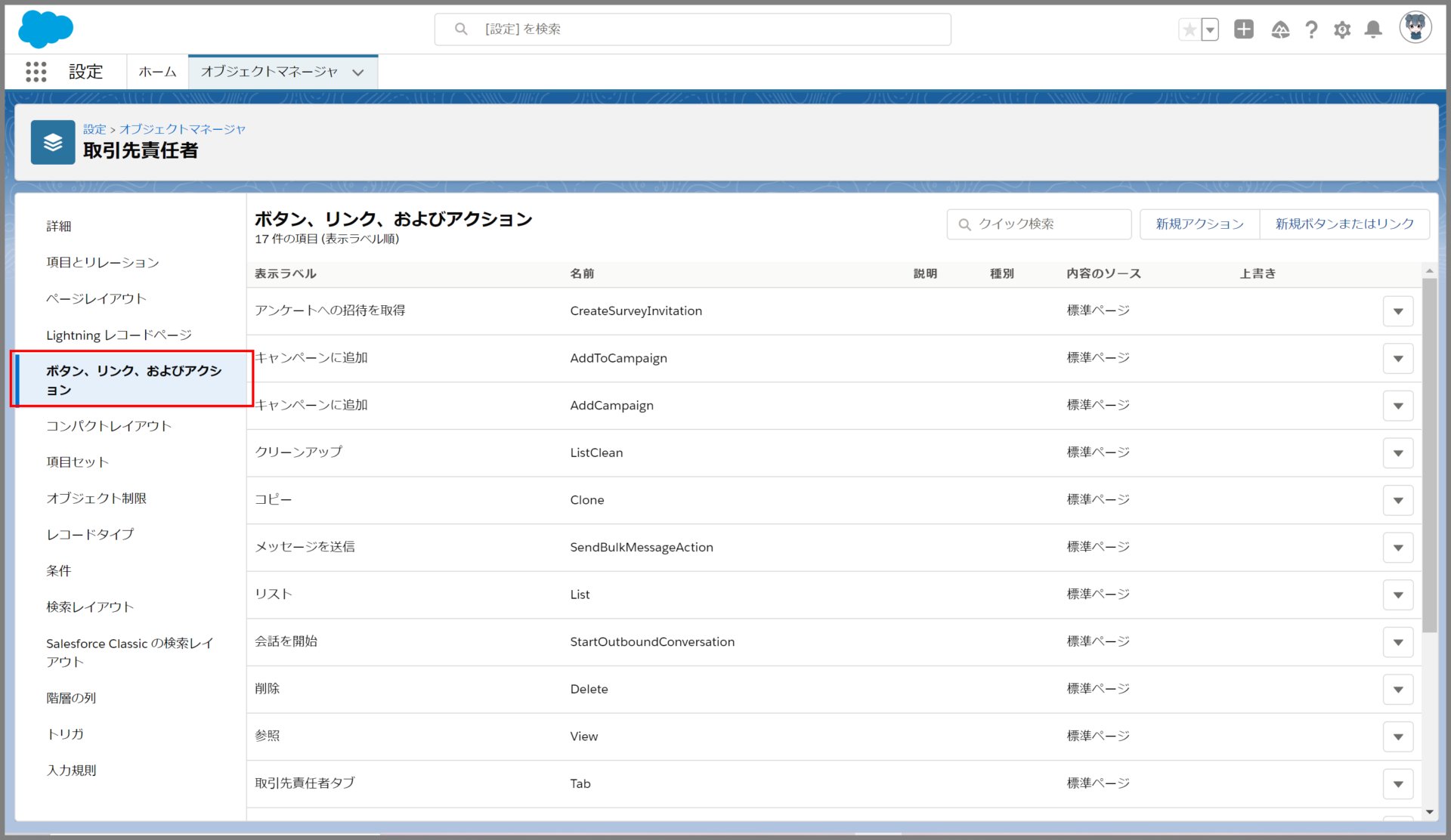
1.オブジェクトマネージャから取引先責任者を検索し、[ボタン、リンク、およびアクション]のメニューから「新規ボタンまたはリンク」ボタンをクリックします。
2.続いて、ボタンの内容を以下の通り設定します。
- 表示ラベル:ボタンのラベル名を入力
- 名前:API名をアルファベットで入力
- 表示の種類:リストボタン ※チェックボックスの表示はどちらでもよい
- 動作:現在のウインドウにサイドバー付きで表示
- 内容のソース:URL
- 内容:以下の内容をセットしてください。
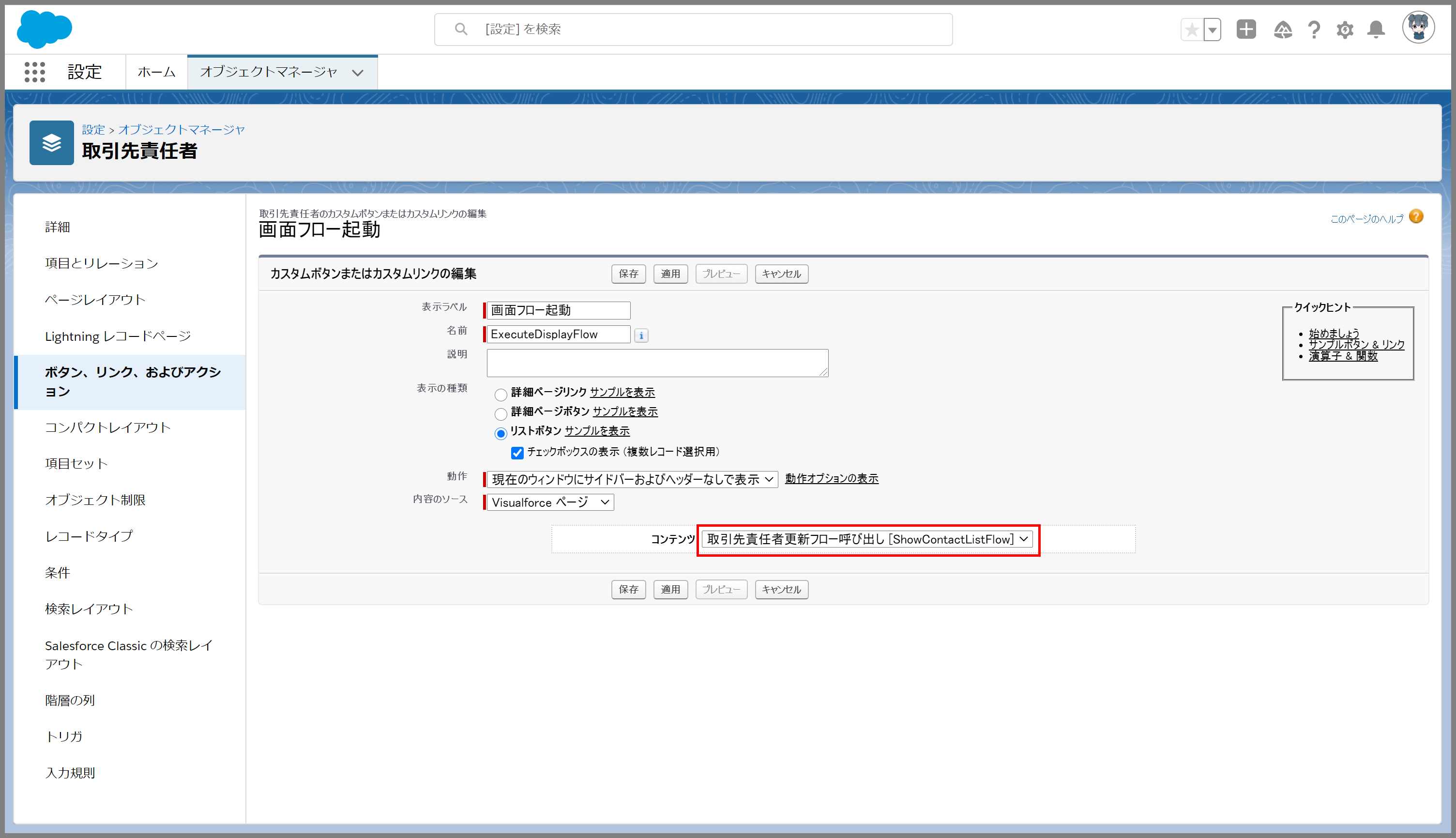
※Visualforceの標準コントローラ(StandardController)で取引先責任者(Contact)が設定されていないとコンテンツでは作成したVisualforceページが選択できないため、表示されていない場合はもう一度Visualforceが正しく作成されているか確認しましょう。
4.カスタムボタンを取引先責任者へ表示する
1.Salesforce Classicの検索レイアウトで、リストビューの▼ボタンから編集を実行します。
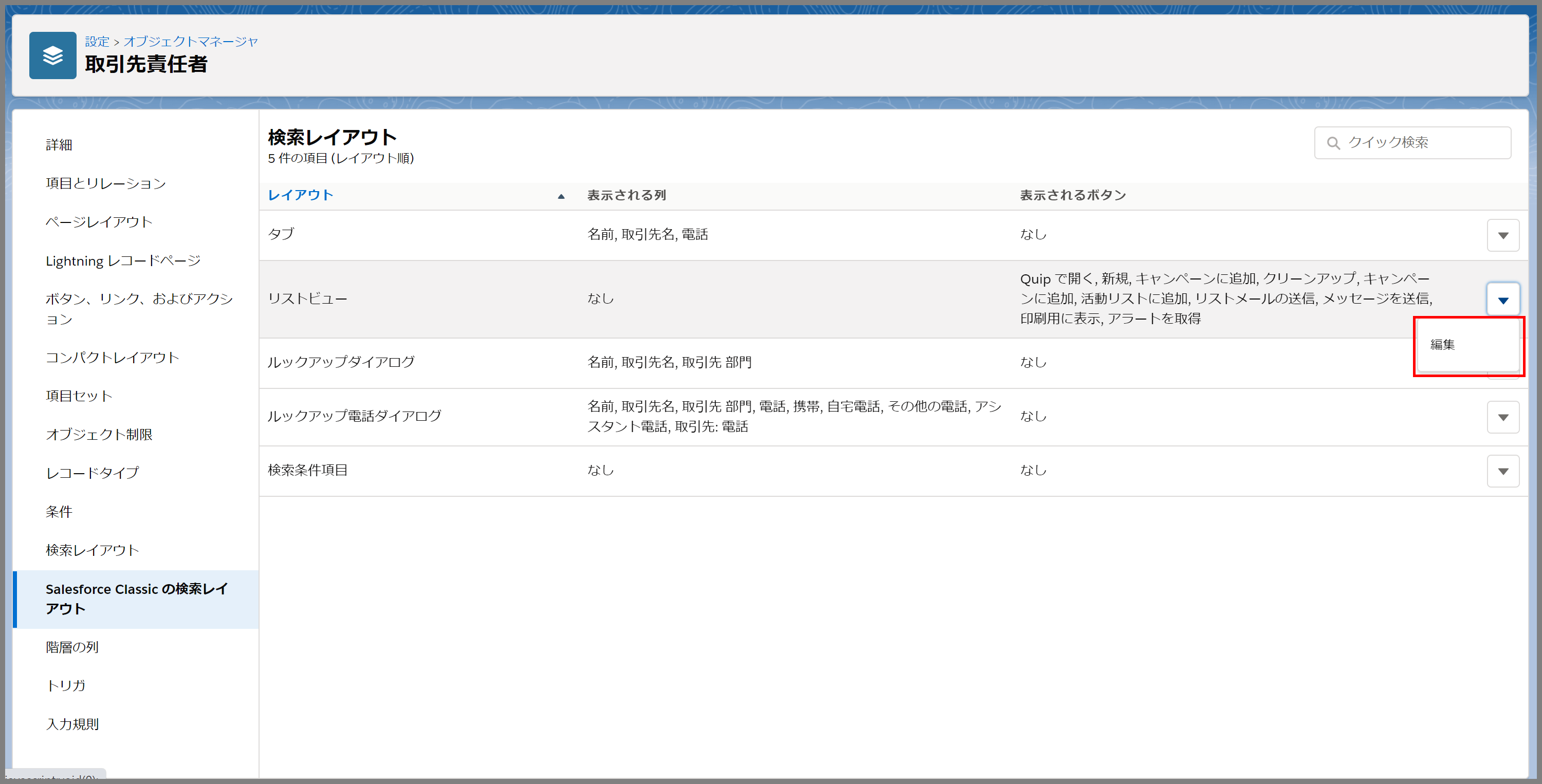
取引先責任者をリストビューでは、先ほど作成したカスタムボタンが利用可能となっているので、選択して保存します。
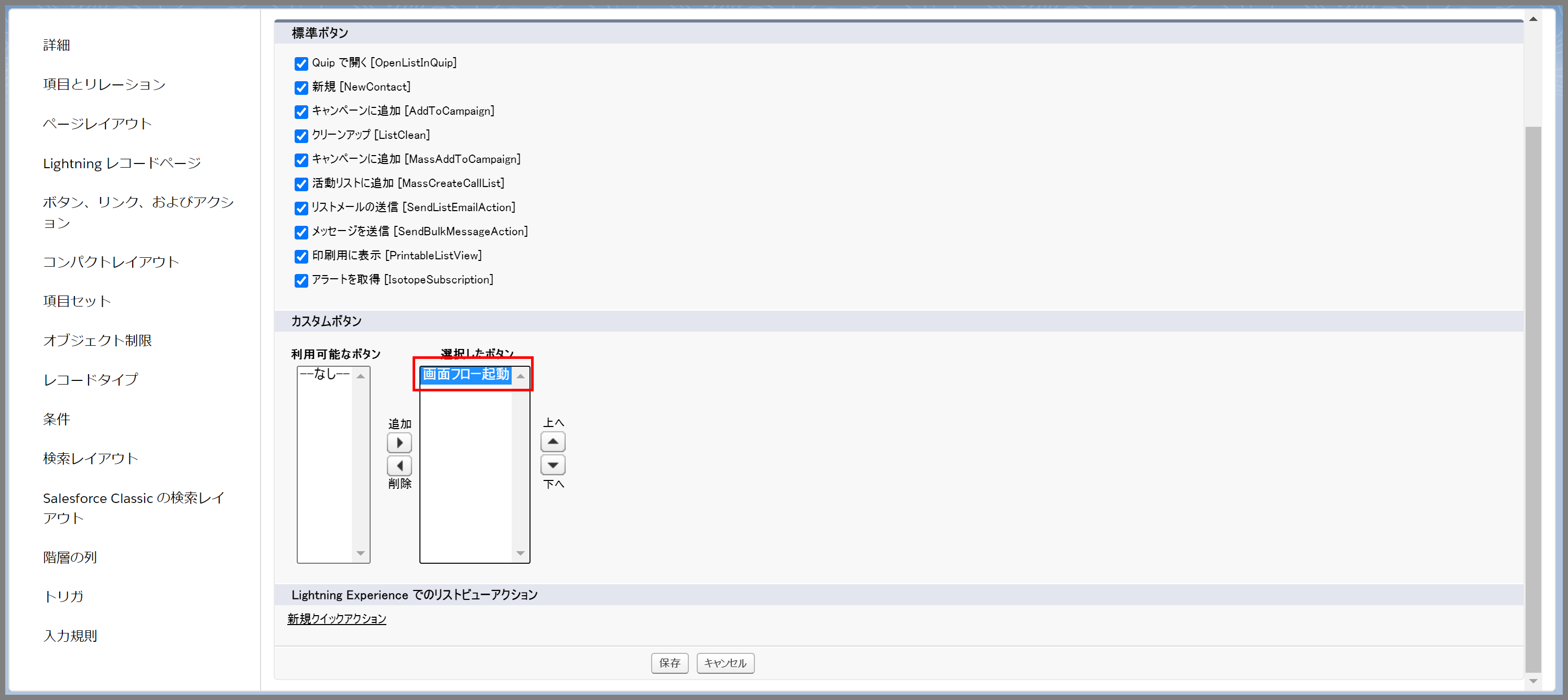
※標準ボタンが多いと表示されなくなるので、不要なチェックはすべて外しておきましょう。
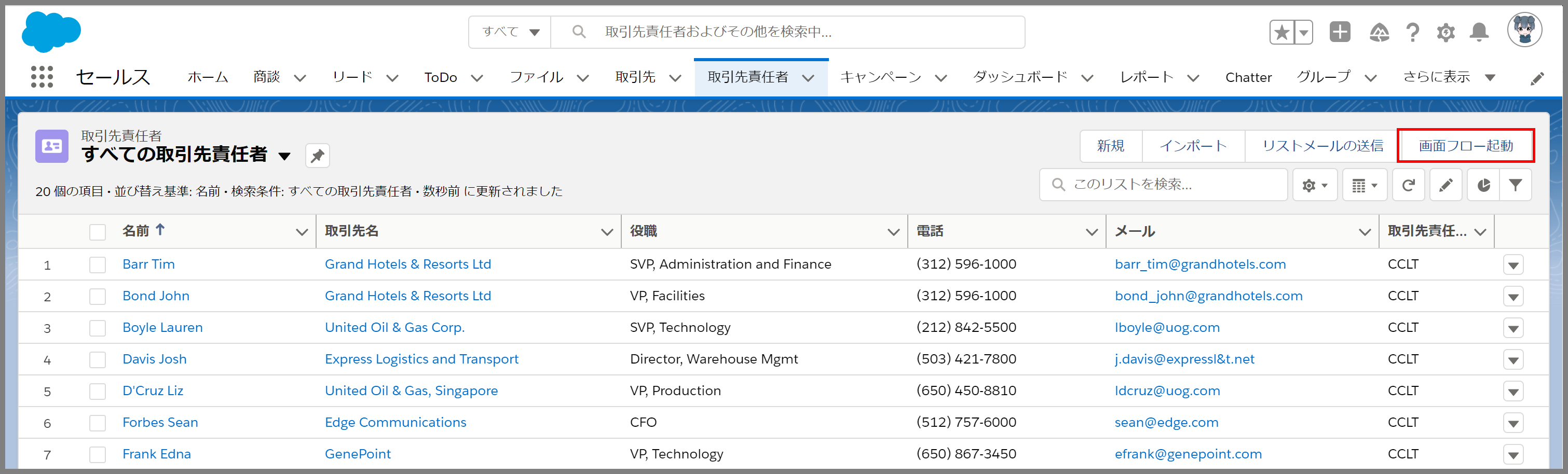
正しく設定されると以下のようにボタンが表示されます。
5.処理を実行して、設定内容を検証する
1.取引先責任者のリストビューから複数の取引先責任者を選択して、[画面フロー起動]ボタンをクリックします。

2.選択された取引先責任者のレコードはVisualforceページ経由で画面フローへ引き渡され、画面フローのテキストで表示されることが確認できます。
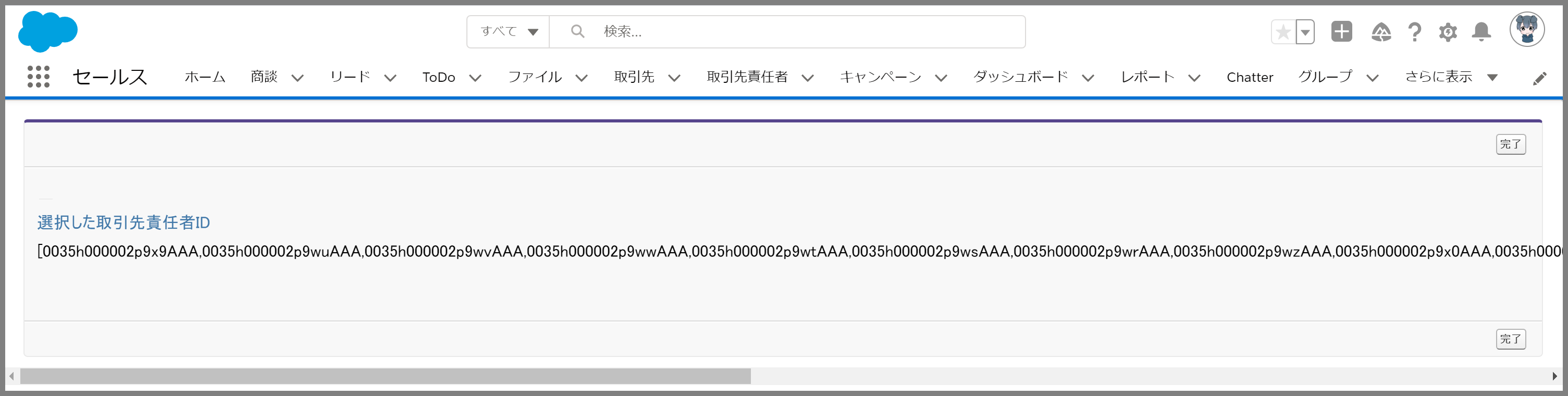
以上で設定から検証まで完了となります。
(2023/02/17 Update)
サポーターさん
取得したIDの一覧はこのままの状態では、フローの中で繰り返し処理を行ったりすることができません。
Apexコードに上記取得したIDの文字列を渡して、String型のリストに変換することで、繰り返し処理などを行うことができます。
Apexコードのサンプルは以下となります。
サンプルコード
/**--------------------------------------------------------------------------
プログラム名 CCLT_MultiSelectFlowIds
* 概 要 :セミコロン区切りのID文字列をフロー対応のリスト型にして返却する
* 作成日 :2023.02.17
* 作成者 :クリエイティブコンテンツラボトウキョウ
*--------------------------------------------------------------------------**/
public with sharing class CCLT_MultiSelectFlowIds {

@InvocableMethod(label='FlowのIDリストを指定' description='セミコロン区切りのID文字列をフロー対応のリスト型にして返却する')
public static List<List<String>> getIdList(List<String> ids) {

if(!(ids.isEmpty())){
string tempStr = ids[0];
List<String> lstnew = tempStr.split(';');
list<list<string>> finalLst = new list<list<string>>();
finalLst.add(lstnew);
return finalLst;
//IDリストが指定されていない場合NULLを返却
} else {
return null;
}
}
}
※こちらはテストクラスのサンプルです。
/**--------------------------------------------------------------------------
* プログラム名:CCLT_MultiSelectFlowIdsTest
* 概 要 CCLT_MultiSelectFlowIdsテストクラス
* 作成日 :2023.02.18
* 作成者 :クリエイティブコンテンツラボトウキョウ
* --------------------------------------------------------------------------**/
@isTest(SeeAllData=false)
public with sharing class CCLT_MultiSelectFlowIdsTest {
@isTest
public static void getIdList_case1() {
// 取引先を作成
Account acc1 = new Account(name='cclt');
insert acc1;
// 募集人を2名作成
List<Contact> conList = new List<Contact>();
conList.add(new Contact(FirstName='creative', Lastname='content',AccountId=acc1.id));
conList.add(new Contact(FirstName='lab', Lastname='tokyo',AccountId=acc1.id));
insert conList;
//String型のリストを生成
List<String> ids = New List<String>();
//取引先のIDをセミコロンで結合した文字列をStringリストに格納
ids.add(conList[0].id + ';' +conList[0].id);
//テスト開始
Test.startTest();
//セミコロンで結合したIDをIDのリスト型で返却するメソッドを実行
List<List<String>> listd = CCLT_MultiSelectFlowIds.getIdList(ids);
//リストのレコードが2件返却されればOK
system.assertEquals(2,listd[0].size());
//テスト終了
Test.stopTest();
}
/**
* メソッドに空文字列を渡した場合にNULLが返却されることを確認
*/
@isTest
public static void getIdList_case2() {
//文字列のリストを生成 ※値は設定しない
List<String> ids = New List<String>();
//テスト開始
Test.startTest();
List<List<String>> listd = CCLT_MultiSelectFlowIds.getIdList(ids);
//NULLが返却されればOK
system.assertEquals(null,listd);
//テスト終了
Test.stopTest();
}
}
まとめ
いかがでしたでしょうか。説明した手順で設定はうまくいきましたか。
今回は、画面フローで取引先責任者のIDを表示する方法をご紹介しましたが、実際に利用する場合は、このあと取得したレコード分繰り返し処理を行いい、更新用のレコード変数を作成したり、リストが未選択の場合のエラー処理や画面表示を追加するなど具体的なロジックを入れることになります。
それでは、また。


hey there and thank you for your info – I’ve definitely picked up something
new from right here. I did however expertise some technical issues using this site,
as I experienced to reload the web site lots of
times previous to I could get it to load properly.
I had been wondering if your hosting is OK?
Not that I’m complaining, but sluggish loading instances times will sometimes affect your placement in google and can damage your
quality score if advertising and marketing with Adwords.
Well I’m adding this RSS to my email and could look out for
a lot more of your respective interesting content. Make sure you update this
again soon.. Escape rooms
Real great info can be found on site.!
Very interesting details you have mentioned, thanks for
putting up. Travel guide
Right here is the right blog for anybody who hopes to understand this topic. You know a whole lot its almost hard to argue with you (not that I actually will need to…HaHa). You certainly put a fresh spin on a subject that has been written about for many years. Great stuff, just excellent.
The very next time I read a blog, I hope that it won’t disappoint me just as much as this particular one. After all, Yes, it was my choice to read, however I truly believed you would probably have something useful to talk about. All I hear is a bunch of whining about something that you could fix if you weren’t too busy searching for attention.
Saved as a favorite, I love your blog.
Great post. I am facing some of these issues as well..
May I simply say what a comfort to uncover somebody that actually knows what they are discussing over the internet. You definitely understand how to bring a problem to light and make it important. A lot more people have to read this and understand this side of your story. It’s surprising you are not more popular given that you certainly possess the gift.
Great blog you have got here.. It’s hard to find good quality writing like yours nowadays. I seriously appreciate individuals like you! Take care!!
I quite like looking through a post that can make people think. Also, thank you for permitting me to comment.
That is a really good tip particularly to those new to the blogosphere. Simple but very accurate information… Thanks for sharing this one. A must read article!
Your style is very unique compared to other folks I have read stuff from. Thanks for posting when you’ve got the opportunity, Guess I’ll just book mark this web site.
bookmarked!!, I love your blog!
Good post. I absolutely love this website. Continue the good work!
Aw, this was an incredibly nice post. Taking a few minutes and actual effort to generate a great article… but what can I say… I put things off a lot and don’t seem to get anything done.
Yüksek bahislerle futbol bahislerinde devasa kazançlar kazanmak çok kolay!
Spot on with this write-up, I absolutely believe this website needs a great deal more attention. I’ll probably be returning to read through more, thanks for the information!
Having read this I thought it was extremely informative. I appreciate you spending some time and energy to put this short article together. I once again find myself personally spending a lot of time both reading and commenting. But so what, it was still worth it!
You are so awesome! I do not think I have read through something like that before. So good to discover someone with genuine thoughts on this subject matter. Really.. thanks for starting this up. This web site is something that is required on the web, someone with a little originality.
Excellent write-up. I certainly love this site. Stick with it!
I’m amazed, I have to admit. Seldom do I come across a blog that’s equally educative and entertaining, and without a doubt, you’ve hit the nail on the head. The problem is something that too few folks are speaking intelligently about. I’m very happy that I came across this during my hunt for something concerning this.
You have made some really good points there. I checked on the net to learn more about the issue and found most individuals will go along with your views on this web site.
You ought to be a part of a contest for one of the most useful blogs on the net. I most certainly will highly recommend this blog!
Excellent web site you’ve got here.. It’s difficult to find high quality writing like yours nowadays. I seriously appreciate individuals like you! Take care!!
Hi there! I simply would like to give you a huge thumbs up for the excellent info you’ve got here on this post. I will be coming back to your blog for more soon.
Having read this I believed it was very enlightening. I appreciate you taking the time and effort to put this informative article together. I once again find myself personally spending a significant amount of time both reading and leaving comments. But so what, it was still worth it.
This is the perfect webpage for anybody who hopes to find out about this topic. You know a whole lot its almost tough to argue with you (not that I really would want to…HaHa). You certainly put a new spin on a subject which has been written about for a long time. Excellent stuff, just great.
Everyone loves it when people come together and share thoughts. Great blog, stick with it!
Aw, this was an exceptionally good post. Finding the time and actual effort to generate a superb article… but what can I say… I procrastinate a lot and don’t manage to get nearly anything done.
I’m amazed, I have to admit. Seldom do I encounter a blog that’s both equally educative and entertaining, and without a doubt, you have hit the nail on the head. The issue is something too few people are speaking intelligently about. I’m very happy that I found this in my search for something concerning this.
Slot oyunlarında her spin büyük bir kazanç fırsatı sunuyor, bu casino favorim!
Everything is very open with a clear description of the challenges. It was really informative. Your site is useful. Thanks for sharing!
Turnuvalar sayesinde ekstra kazançlar elde ettim.
Slot oyunlarında her spin heyecan verici, bu casino’da kazanmak çok kolay!
Casino bonusları gerçekten cömert, slot oyunlarında büyük kazançlar sağlıyor.
Greetings! Very useful advice within this article! It’s the little changes that produce the greatest changes. Thanks a lot for sharing!
Casino’nun sunduğu slot turnuvaları ile ekstra kazançlar elde etmek çok kolay.
Hey there! Do you know if they make any plugins to assist with SEO?
I’m trying to get my blog to rank for some targeted keywords but
I’m not seeing very good results. If you know of any please share.
Cheers! I saw similar blog here: Warm blankets
An impressive share! I’ve just forwarded this onto a colleague who had been doing a little homework on this. And he actually bought me dinner because I discovered it for him… lol. So let me reword this…. Thank YOU for the meal!! But yeah, thanks for spending the time to talk about this matter here on your blog.
This is a really good tip particularly to those fresh to the blogosphere. Simple but very accurate information… Appreciate your sharing this one. A must read article!
I must thank you for the efforts you’ve put in penning this blog. I am hoping to see the same high-grade blog posts by you later on as well. In truth, your creative writing abilities has motivated me to get my own, personal blog now 😉
This is the right webpage for anybody who wishes to find out about this topic. You realize so much its almost hard to argue with you (not that I personally would want to…HaHa). You certainly put a brand new spin on a subject which has been discussed for many years. Excellent stuff, just excellent.
I would like to thank you for the efforts you have put in penning this website. I’m hoping to see the same high-grade blog posts from you in the future as well. In fact, your creative writing abilities has inspired me to get my very own blog now 😉
What’s up to all, how is all, I think every one is getting more from this website, and your views are good for new people.